
Context Engineering for AI-Assistant Development
A four-layer approach to organizing project knowledge, tools, hooks, and skills so they work across AI coding tools without maintaining parallel configs.
AI coding tools have a context problem. Every token loaded into a context window competes for the model's attention. Stanford and Berkeley research documented the "lost-in-the-middle" phenomenon: LLMs perform best when relevant information is at the beginning or end of the input, with significant degradation when it is buried in the middle. Practitioners have found that models become unreliable when context usage exceeds 40-60% of maximum capacity. A model claiming 200K tokens becomes unreliable around 130K.
So what we include matters. When we include it matters. How we organize it matters. Anthropic frames the challenge clearly: building effective AI agents is less about finding the right words and more about answering the question, "What configuration of context is most likely to generate the desired behavior?"
We've gone from one tool with one config file to three or four AI coding tools, each with its own conventions for context files, skill directories, and configuration formats. Claude Code reads CLAUDE.md. Gemini CLI reads GEMINI.md. Codex CLI reads AGENTS.md. Copilot wants .github/copilot-instructions.md. Maintain separate configs for each tool, and you're managing the same knowledge in multiple places. Change a convention in one file, forget to update another, and your tools start contradicting each other.
Thoughtworks' analysis of context engineering for coding agents found that the number of configuration options has exploded, with Claude Code leading innovations and other tools quickly following. The fragmentation creates a real maintenance burden.
Don't pick one tool. Build a shared knowledge architecture that any tool can consume, with thin wrappers for tool-specific quirks. After a year working with Claude Code, Codex CLI, and Gemini CLI across a modular codebase, I've converged on a four-layer approach that separates concerns and keeps things tool-agnostic.
A Layered Approach
Two dimensions matter for understanding how context reaches the model.
The first is what decides to load it. Böckeler's analysis identifies three triggers: the agent software automatically loads some context on every interaction (your AGENTS.md), the LLM decides to load other context when it judges it relevant (skills, MCP tools), and the developer explicitly triggers the rest (slash commands, manual file references). This distinction matters because it determines reliability. Agent-loaded context is deterministic. LLM-loaded context is probabilistic; the model might not activate a skill when you expect it to.
The second is whether execution is probabilistic or guaranteed. Most of this architecture is probabilistic guidance. Project knowledge and skills describe what the model should do, and it probably follows them. Probably. Hooks are different. They fire deterministically, executing shell commands at lifecycle boundaries regardless of the model's decision. You can write "always run Prettier after editing files" in your AGENTS.md, and the model will follow it most of the time. A hook guarantees it.
These two dimensions are organized into four layers:
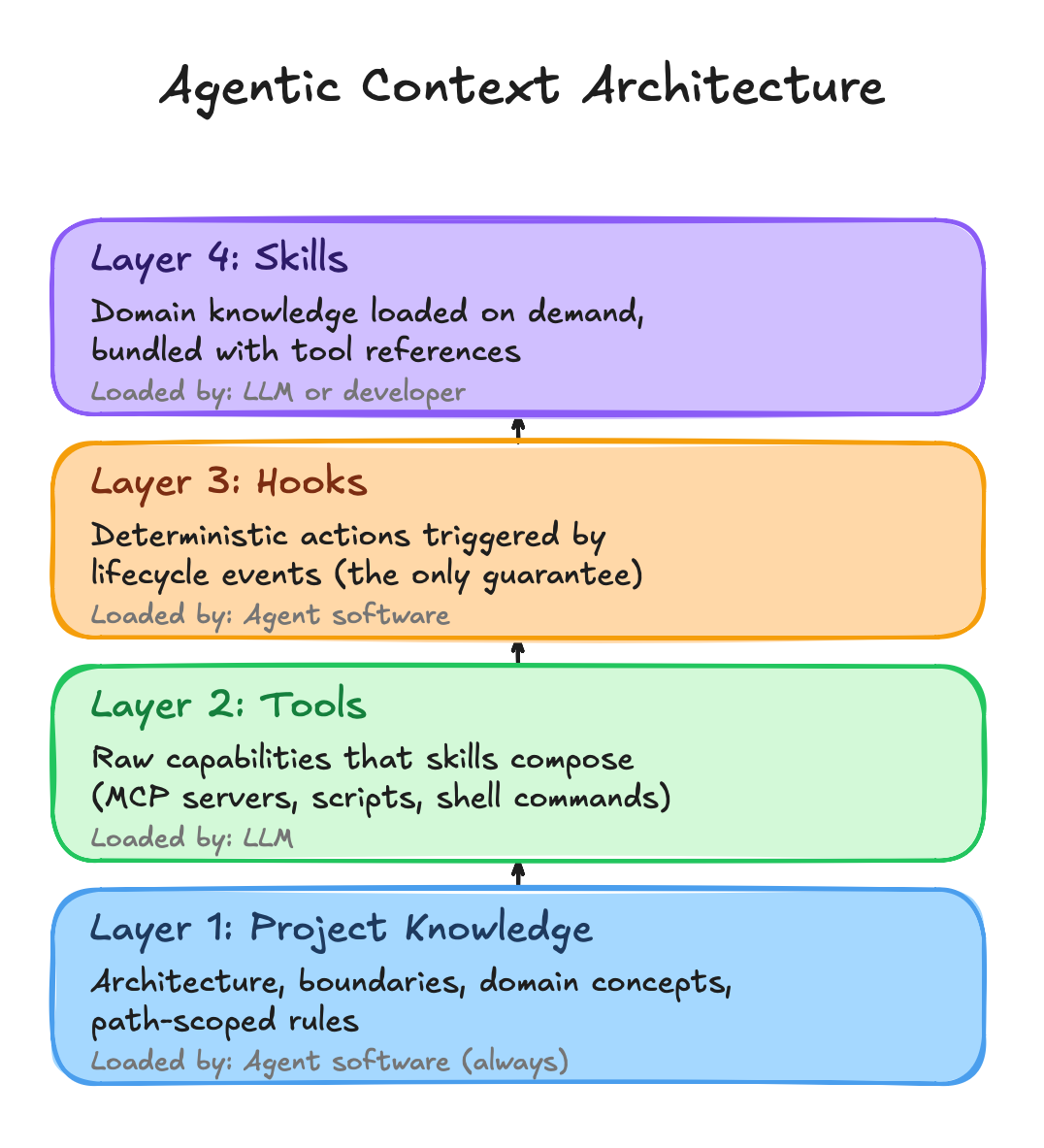
The dependency direction flows upward. Project Knowledge orients the AI on every interaction. Tools provide raw capabilities. Hooks enforce deterministic behavior at lifecycle boundaries. Skills bundle domain knowledge with tool references and load on demand.
Layer 1: Project Knowledge
Project Knowledge answers "where am I and what matters here." It describes the architecture, module boundaries, conventions, and domain concepts. Without it, an AI tool has capabilities but no orientation.
AGENTS.md is the portable format: a markdown file at the repository root and optionally in module directories. The AGENTS.md specification emerged in mid-2025 as a vendor-neutral standard, now stewarded by the Agentic AI Foundation under the Linux Foundation. It's been adopted by over 60,000 repositories and is supported by Codex CLI, Cursor, GitHub Copilot, and others. Claude Code and Gemini CLI can be configured to read it.
The format cascades. An agent reads the root AGENTS.md first, then the local one for the current directory. This mirrors how .gitignore works: the closest file takes precedence. A root file describes the overall architecture and conventions. Module-level files describe internal structure, dependencies, and domain concepts specific to that module.
Keep it concise. There's a practical constraint: frontier models can reliably follow roughly 150-200 instructions before consistency degrades. Smaller models handle fewer. Every instruction in your AGENTS.md competes with every other instruction for the model's attention. Community advice converges on keeping AGENTS.md files under 150 lines. A 500-line AGENTS.md with embedded examples, full API schemas, and copy-pasted documentation doesn't make the model smarter. It makes it worse. Describe the module's purpose, boundaries, and conventions, then point to skills for detailed patterns.
Where a tool requires its own context file, the tool-specific file should reference AGENTS.md and add only tool-specific instructions. One source of truth, thin wrappers.
# CLAUDE.md
See AGENTS.md for project architecture and module context.

## Tool-Specific Notes
- MCP servers available: Filesystem, GitHub
- Skills directory: `.agents/skills/`
For Gemini CLI, configure it to read AGENTS.md directly by adding {"context":{"fileName":["AGENTS.md"]}} to .gemini/settings.json. This eliminates the wrapper entirely.
Path-Scoped Rules
Some tools support path-specific conventions that fire when the AI encounters a particular file type. Think of them as file-type checklists: "when you see this kind of file, check these things." These complement the broader project knowledge without duplicating it.
This is the least portable part of the architecture. Copilot uses .github/instructions/*.md with applyTo frontmatter. Claude Code uses .claude/rules/. Cursor uses .cursor/rules/*.mdc. Other CLI tools don't support path-scoped rules at all. Author them in the format of your primary tool and accept this as tool-specific.
Rules are checklists, not architecture descriptions. They don't duplicate what AGENTS.md covers. Each rule file stays under 20 lines and delegates to skills for detail. If a rule file starts describing module purpose, dependencies, and domain concepts, that content belongs in AGENTS.md.
---
applyTo: ["**/*Controller.ts", "**/*Service.ts"]
---
# Service Files
- Single responsibility per service
- Dependencies injected via constructor
- Error handling with typed exceptions
- Service under 300 lines

→ Detailed patterns: `.agents/skills/backend/`
Layer 2: Tools
Tools provide raw capabilities: querying systems, running builds, searching code, and linting files. They're primitives that don't know about project conventions. Skills compose them.
MCP is the standard transport for external tool connections. Every major tool supports stdio-based MCP servers. Build an MCP server once, and it works across Claude Code, Codex CLI, and Gemini CLI.
But MCP has a cost. Every connected MCP server loads its tool definitions into the context window upfront, whether you need them or not. Anthropic's guidance on MCP efficiency documents the problem: as connected tools grow, loading all definitions slows agents and increases costs. Connect several MCP servers, and you can burn 50,000+ tokens before the conversation starts. That's context budget consumed by tool descriptions rather than project knowledge.
Be selective. Connect only the MCP servers that the current workflow requires. If a tool has deterministic I/O and doesn't need runtime queries, a shell script is cheaper than an MCP server. Reserve MCP for external APIs, databases, and services that need dynamic interaction.
Layer 3: Hooks
Hooks are the only deterministic layer in this architecture. They're shell commands that fire at specific lifecycle events regardless of what the model decides. A PostToolUse hook that runs your formatter after every file write doesn't depend on the model remembering to format. It runs every time.
As Anthropic's documentation puts it: "Prompts are great for suggestions; hooks are guarantees."
Claude Code and Gemini CLI both support hooks with similar event models. Claude Code offers PreToolUse, PostToolUse, SessionStart, and Stop events. Gemini CLI added hooks in January 2026 with equivalent events: BeforeTool, AfterTool, BeforeAgent, AfterAgent. The hook scripts themselves are fully portable shell commands. Only the configuration wrapper differs.
The most practical hook patterns fall into three categories. Formatting and linting: run your code formatter after every file write so the model never produces code that violates style rules. Safety gates: block dangerous operations like rm -rf, writing to production configs, or committing secrets. Context injection: load recent git commits, open tickets, or environment state at session start so the model has fresh context without you pasting it manually.
{
  "hooks": {
    "PostToolUse": [
      {
        "matcher": "Edit|Write",
        "hooks": [
          {
            "type": "command",
            "command": "npx prettier --write \"$(jq -r '.tool_input.file_path')\""
          }
        ]
      }
    ]
  }
}
One caution: hooks run with your full user permissions. There's no sandbox. Treat hook scripts like production code. Validate inputs, use absolute paths, and be deliberate about what you allow.
Layer 4: Skills
Skills are where this architecture pays off. A skill bundles everything an AI needs to understand a domain and do work in it: reference documentation, checklists, templates, and the tool invocations required to complete actions.
The Agent Skills specification was released as an open standard in late 2025 and has been adopted by Microsoft, OpenAI, Atlassian, Figma, Cursor, and GitHub. The format is deliberately simple: a directory containing a SKILL.md file with YAML frontmatter and markdown instructions, plus optional scripts and references.
Skills solve the context budget problem with progressive disclosure. At startup, the model sees just the skill's metadata, roughly 100 tokens describing what it does. The full instructions load only when the model determines the skill is relevant. The specification recommends keeping SKILL.md instructions under 5,000 tokens. Additional references load on demand, so smaller files mean less context consumption.
skills/backend/
├── SKILL.md              # What this skill knows and can do
├── references/           # Patterns, examples, anti-patterns
│   ├── patterns.md       # Canonical patterns (single source of truth)
│   └── anti-patterns.md  # What to avoid
├── checklists/           # Structured criteria
│   └── service-review.md # Applies references during review
└── templates/            # Scaffolding
    └── service.md        # Applies references during generation
Organize by domain, not by activity. A react-review skill and a react-generation skill would duplicate the same pattern knowledge. Instead, a single react skill contains all the patterns, with separate checklists for review and templates for generation.
Token generation is probabilistic. Scripts are deterministic.
Skills can also leverage scripts for deterministic tasks. When you need exact behavior, like validating against a checklist or applying a specific code transformation, the skill runs a script rather than asking the model to generate the logic each time.
Making It Portable
Author content in generic formats, store it in one location, and point tools to that location.
The obvious approach is to symlink from every tool-specific directory to one canonical location. This creates a problem. VS Code automatically scans .github/skills/, .claude/skills/, and .agents/skills/. If the same skill appears in multiple directories via symlinks, it shows up multiple times in the slash command menu. Duplicate skill names cause .github/skills/ to take precedence, but the duplicates clutter the UI and waste the discovery budget.
The cleaner approach: pick one canonical directory and configure tools to read from it. .agents/skills/ is the natural choice since it's the vendor-neutral location that Codex CLI scans natively. For tools that don't scan .agents/skills/ by default, use a single symlink from their expected location. Avoid creating parallel paths that VS Code will discover independently.
project/
├── AGENTS.md                          ← Portable context (all tools)
├── CLAUDE.md                          ← Imports AGENTS.md + Claude notes
├── .mcp.json                          ← MCP server config (Claude Code)
├── .agents/
│   └── skills/                        ← Canonical skill location
│       ├── backend/
│       ├── frontend/
│       └── testing/
├── .claude/
│   └── skills -> ../.agents/skills    ← Symlink (Claude Code)
├── .gemini/
│   ├── skills -> ../.agents/skills    ← Symlink (Gemini CLI)
│   └── settings.json                  ← Reads AGENTS.md
├── .github/
│   └── instructions/                  ← Path-scoped rules (Copilot)
└── modules/
    └── auth/
        └── AGENTS.md                  ← Module-specific knowledge
.github/skills/ is absent. VS Code already discovers .agents/skills/ and .claude/skills/, so adding a third symlink in .github/skills/ would triple every skill in the dropdown. If your primary tool is VS Code with Copilot, you could use .github/skills/ as the canonical location and symlink from .claude/ and .agents/ instead. One real directory and symlinks where the tool can't discover the canonical location.
Portability varies by layer. Project Knowledge and Skills are highly portable because AGENTS.md and SKILL.md are cross-tool standards. Tools are highly portable because MCP is the universal transport protocol. Hooks have moderate portability: Claude Code and Gemini CLI use similar event models, but Codex CLI doesn't support hooks yet. Path-scoped rules have the lowest portability, with no universal standard across tools.
Where This Breaks Down
The four layers handle static context well: the project knowledge, conventions, and domain expertise that don't change within a session. They don't solve the harder problems that emerge during extended work.
Long sessions and context rot. As a session accumulates conversation history, tool outputs, and intermediate results, the model's effective working memory shrinks. Chroma Research documented this: related-but-irrelevant content is worse than random noise because it looks relevant enough to distract. No amount of AGENTS.md tuning fixes a context window that's 80% full of stale conversation.
Trajectory poisoning. When a session goes wrong, errors become context for subsequent reasoning. The model builds on its own mistakes, and no amount of correction fixes a poisoned trajectory. The context itself is the problem.
The reasoning cliff. As tasks require more reasoning steps or involve more interacting variables, model accuracy doesn't decline gradually. It collapses. Apple's GSM-Symbolic research found that adding a single irrelevant clause to a math problem led to performance drops of up to 65% across all models. You can't fix a task that's past the cliff by prompting better. You have to simplify the task itself.
Cross-agent handoffs. Subagents help by providing a clean context window for each step. But information gets lost at the boundary. The summary a subagent returns is never as rich as the full context it operated in. Important nuances, edge cases discovered during the investigation, and contextual reasoning are all compressed into a few hundred tokens.
What Practitioners Actually Do
The teams getting consistent value from AI coding tools have developed instincts that complement the static architecture.
Start fresh when quality degrades. The most practical response to trajectory poisoning is simple: commit your work, close the session, and start a new one with a clean context. Treat sessions like git branches. When one goes sideways, abandon it rather than trying to salvage the accumulated mess.
Keep tasks small. Multi-file benchmark data shows 87% success on single-file tasks, dropping to 19% on multi-file infrastructure work. Limit each task to touching 2-3 files. If you can't explain what the AI should do in a sentence or two, the task is too big. Split it.
Use subagents for context isolation, not role-playing. Agents aren't about personas. Their value lies in constraining which context loads at each step. A research subagent pulls documentation and API references. An implementation skill loads only the module being modified. Think of subagents as context boundaries.
Plan before prompting. Write your own requirements. Make your own architecture decisions. Draft your own test cases. Then use the AI for implementation. As Osmani describes it, start by brainstorming a detailed specification with the AI, outlining a step-by-step plan, and then writing code. The upfront investment feels slow but prevents wasted cycles when the model goes off-track.
Getting Started
Start simple. Create an AGENTS.md at your project root with the architecture summary, module map, and key conventions. Whenever you find yourself giving the AI the same instruction twice, add it to AGENTS.md instead.
Then identify your first skill. Pick the domain where your team spends the most time correcting AI output. If the AI keeps generating code that violates your architecture patterns, that's your first skill. Encode the patterns, create a checklist, and point to example files in the codebase.
Set up the symlink structure early. Create .agents/skills/ as your canonical location, then symlink from .claude/skills/ and .gemini/skills/. One-time cost that pays off every time you add or modify a skill.
Add layers incrementally. Path-scoped rules when you notice file-type-specific mistakes. Hooks when you find yourself repeating "please run the formatter" in every session. Don't build the full architecture before you've validated that the first two layers are working.
Monitor what's actually reaching the model. Claude Code's /context command shows what's loaded and how much space each piece consumes. Gemini CLI's /stats provides similar visibility. If your AGENTS.md and MCP tool definitions are consuming 40% of the context window before you've typed anything, the architecture needs trimming. The best context engineering is invisible when it works and diagnosable when it doesn't.
Treat these files like code. Subject them to code review, version them, and update them when conventions change. Teams that get consistent value from AI tools invest in maintaining this context architecture alongside their codebase.
Where the Standards Are Headed
The standardization landscape is moving fast. AGENTS.md and the Agent Skills format have broad adoption, but both specifications are young. A v1.1 proposal for AGENTS.md is working to codify implicit behaviors around discovery, layering, and precedence that the community has adopted but never documented. The community is still debating whether AGENTS.md should eventually be merged into README.md.
Some questions remain open. How detailed should module-level AGENTS.md files be before they become more noise than signal? When does a skill's reference documentation grow large enough to need its own progressive disclosure? How do you measure whether a skill is actually improving AI output quality versus just adding tokens?
The fundamental tension remains: we're building static architectures for tools whose hardest problems are dynamic. The four layers give you the best possible starting position for each session. What happens during the session still depends on task decomposition, session hygiene, and engineering judgment.
The tools improve constantly. The constraints will shift. But the core challenge won't change: AI coding tools are only as good as the context in which they operate. Managing that context with intention, rather than hoping the model figures it out, is how you get consistent value from these tools.
I'm curious how others are handling the multi-tool fragmentation problem. Are you maintaining separate configs per tool, or converging on a shared architecture?